.png)


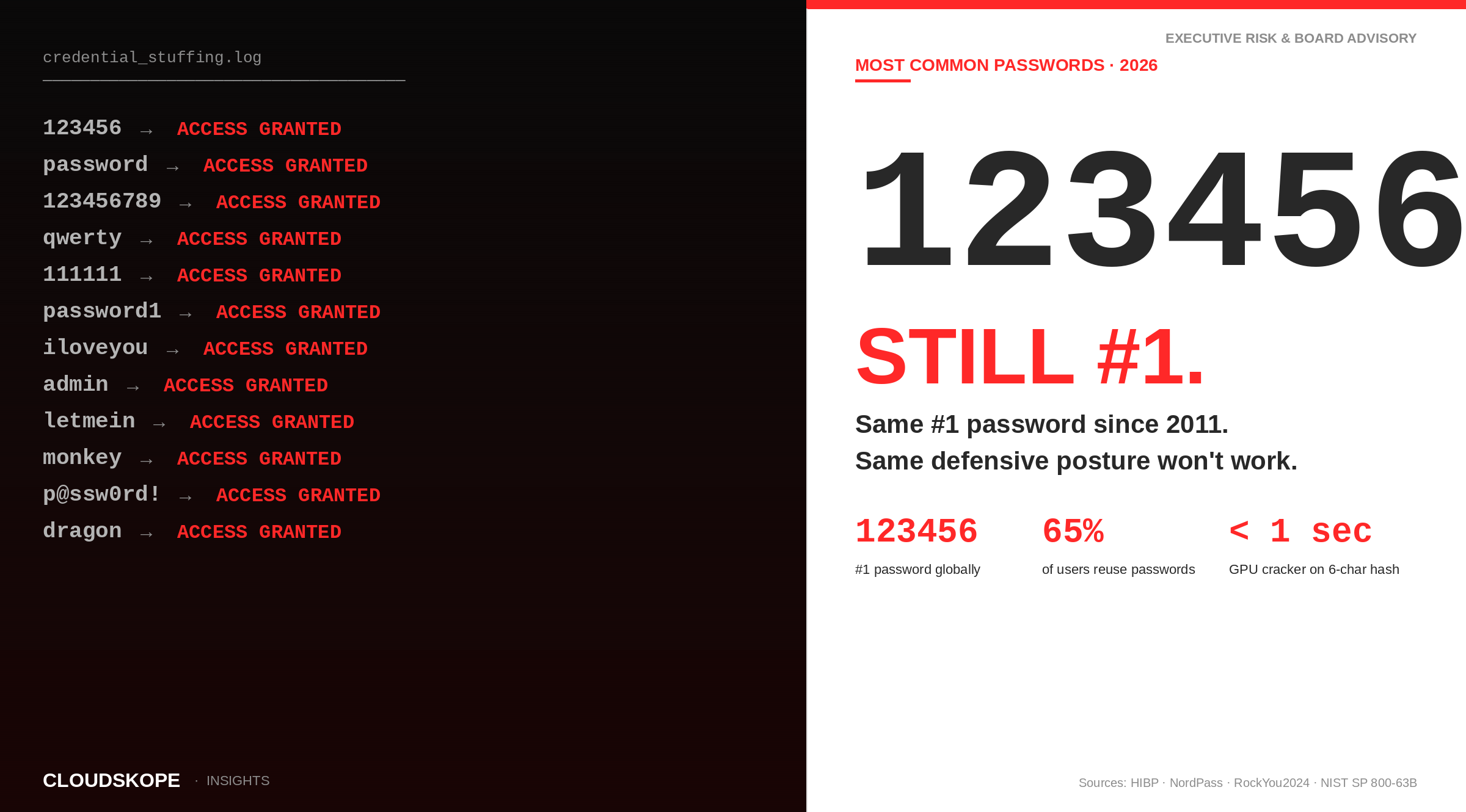
The list of most commonly used passwords has been remarkably stable for over a decade. "123456" has been the most common password in essentially every major analysis since 2011. "password" has been the runner-up. The variants — "123456789," "qwerty," "111111" — rotate through the top ten without substantive disruption. The pattern persists despite extensive public awareness campaigns, despite increasing technical sophistication among consumer-facing platforms, and despite the routine appearance of these passwords in massive credential-stuffing campaigns. This is the 2026 list, with analysis of what the data shows, why the persistence matters, and what boards and executives should be doing about it.
The 2026 list: the 20 most commonly used passwords
Data aggregated from major credential dumps over the past five years — LinkedIn, Adobe, Yahoo, MySpace, Adult Friend Finder, the 2024 RockYou2024 compilation, and the credential-stuffing datasets that surface routinely on underground marketplaces — produce a remarkably stable ranking. Specific orderings vary slightly across the major password-analysis vendors (NordPass, SplashData, Have I Been Pwned), but the top-20 list is substantially the same year over year.
- 123456 — Found in well over 4 million unique accounts across cumulative breach datasets. The most common password globally for at least the last decade.
- password — The runner-up in essentially every analysis. Despite extensive public awareness campaigns, it remains in the top three.
- 123456789 — A longer numeric sequence; offers no cryptographic improvement over its shorter relative.
- 12345678 — Note the recurring pattern: numeric sequences are the dominant category by raw volume.
- qwerty — The first six letters of a standard QWERTY keyboard. Substantially more common than its variants (qwertyuiop, qwerty123).
- 12345 — Often the result of a five-character minimum password requirement encountered in older systems.
- 111111 — A repeated single-character password. The variant patterns (000000, 222222) appear elsewhere in the top 30.
- 1234567 — Yet another numeric sequence variant.
- password1 — The most common "complexity-augmented" variation. The trailing 1 is the dominant complexity addition pattern across all breach data.
- iloveyou — The most common non-numeric, non-keyboard-pattern password. Persistent across cultural and linguistic boundaries.
- admin — The most common default-credential pattern. Frequently observed on internal corporate systems and IoT devices, not consumer accounts.
- welcome — A default frequently set by IT teams for new employees. Should be flagged for forced change at first login.
- monkey — Inexplicably persistent across more than a decade of password analysis. The leading non-obvious word in major datasets.
- letmein — The most common "sentiment" password, expressing the user's intent rather than a memorable object.
- abc123 — A keyboard-adjacent sequence combining alphabetic and numeric characters.
- football — The dominant sports password in U.S.-origin datasets; "soccer" leads in some European datasets.
- 123123 — A repeating numeric pattern.
- dragon — Surprisingly persistent across major password analyses; the most common fantasy-themed word.
- master — Frequently appears in administrative-credential contexts.
- sunshine — The most common single weather-themed word in cumulative breach data.
What the data really shows
The interesting story is not the top 20. The interesting story is what the top 20 represents about the systemic failure of password-based authentication at scale.
Numeric sequences dominate the top tier
Of the top 10 passwords by raw frequency, eight are numeric sequences or near-sequences. The pattern is consistent across regions, languages, and platforms. The structural reason is that humans are remarkably bad at generating high-entropy passwords from a flat namespace of possibilities. When asked to invent a password without a meaningful prompt, most people choose patterns their fingers can produce easily on the keyboard — left-to-right sequences, top-to-bottom rows, or simple repeating characters.
"Complexity requirements" produce predictable transformations
The top-20 list includes "password1" but not "P@ssw0rd!" — yet a system requiring at least one uppercase letter, one digit, and one special character would commonly produce exactly the latter. The complexity-requirement transformation pattern is so well documented in academic literature that modern password-cracking tools incorporate it as a standard rule set: take a common base word, capitalize the first letter, append a digit, optionally substitute letters with similar-looking numbers or symbols. The complexity requirements that were intended to produce stronger passwords have, in operational reality, produced predictable transformations that password-cracking tools handle natively.
Password reuse is the largest amplifier of risk
The cumulative breach corpus is operationally significant precisely because users reuse passwords. The 2012 LinkedIn breach exposed approximately 165 million credentials. The credentials surfaced publicly in 2016 and have been used in credential-stuffing campaigns against every major platform since. A user who used the same password at LinkedIn and at their bank has had that bank credential exposed continuously for nearly a decade. Modern credential-stuffing attacks routinely test billions of leaked credentials against major platforms in automated pipelines that produce hundreds of thousands of successful account takeovers per day across the industry.
The 2024 RockYou2024 compilation
In July 2024, a 10-billion-line password compilation was published on cybercrime forums under the name RockYou2024. The compilation aggregated unique passwords harvested from prior breaches and from credential-stuffing data over many years. The dataset is operationally significant because it represents the practical attack universe: a single source containing essentially every password that has appeared in major breaches over the last fifteen years. Modern credential-stuffing tools incorporate the RockYou2024 dataset as a baseline; any password that appears in it should be considered compromised regardless of where the user used it.
Same #1 password since 2011. Same defensive posture won't work. The 2026 data confirms password authentication is a systemic failure controls — not training — must address.
What this means for boards and executives
The persistent top-20 list is not a problem to be solved by user education campaigns. Multiple decades of "choose a strong password" guidance have produced essentially no change in the aggregate behavior. The list is a problem to be solved by changing what authentication requires. There are three operational paths forward, in approximate order of maturity and durability.
1. Passkeys (FIDO2 / WebAuthn)
Passkeys are public-key-based credentials bound to a specific device and authenticated through biometric or PIN. They are phishing-resistant because the cryptographic challenge-response cannot be replayed against a different domain, and they cannot be stolen through credential dumps because the private key never leaves the user's device. Apple, Google, and Microsoft all support passkeys natively in their consumer and enterprise platforms. Major SaaS applications increasingly support passkey authentication. For consumer-facing platforms, supporting passkeys is now the most material authentication-security investment available.
2. Phishing-resistant MFA (hardware security keys)
FIDO2 hardware security keys (YubiKey, Google Titan, Feitian) provide phishing-resistant MFA in environments where passkeys are not yet supported or where the security model requires a separate physical authenticator from the user's primary device. Hardware keys are the practical authentication standard for high-value accounts — administrative credentials, financial services, regulated industries — and are required by some compliance frameworks for privileged access.
3. Standard MFA (not SMS)
Where phishing-resistant options are not available, time-based one-time password (TOTP) applications (Google Authenticator, Microsoft Authenticator, Authy, 1Password) are the next-best option. SMS-based one-time passwords should be deprecated wherever possible — SIM-swap attacks, SS7 protocol weaknesses, and various social engineering vectors make SMS authentication substantially weaker than other MFA factors. Federal regulators including NIST have formally discouraged SMS-based authentication for sensitive accounts.
The password-manager prerequisite
For accounts that still require passwords — which will be most accounts for the foreseeable future — the operational answer is a password manager. Modern password managers (1Password, Bitwarden, Dashlane, Keeper) generate unique, high-entropy passwords for every account, store them encrypted with a master credential the user controls, and auto-fill them through verified domain matching that provides phishing resistance for password authentication. Enterprise password management is increasingly procured alongside SSO infrastructure as a baseline workforce productivity investment, not a discretionary security upgrade.
What's changing in 2026
The shift toward passkeys accelerated substantially in 2024-2025. Apple, Google, and Microsoft have aligned their consumer ecosystems around passkey support, and major SaaS platforms have followed. The 2026 inflection point is that passkey adoption has now crossed the threshold where supporting passkey-only authentication is operationally viable for major consumer platforms; previously, supporting passkeys was an addition to existing password infrastructure, not a replacement.
The regulatory landscape is also shifting. The FTC's 2024 consent order with Marriott prescribed zero trust architecture by name, and broader regulatory expectations around phishing-resistant MFA are increasingly built into sectoral examinations and enforcement actions. The post-Marriott regulatory trajectory points toward passkey or hardware-token-based phishing-resistant MFA as the baseline expectation for organizations handling consumer data at scale, with SMS-based or password-only authentication treated as a substantive deficiency.
Frequently asked questions
What is the most common password in 2026?
"123456" remains the most common password globally, as it has been for more than a decade. The runner-up is "password" itself. The pattern has been remarkably stable across regions, languages, and platforms despite extensive public awareness campaigns.
How fast can my password be cracked?
For a six-character lowercase password protected only by SHA-1 or MD5 (algorithms still used on some legacy systems), a modern GPU password cracker can recover it in well under one second. An eight-character mixed-case password takes minutes; a twelve-character mixed-case-plus-symbols password takes years to decades. The math changes dramatically when modern memory-hard hash functions (bcrypt, scrypt, Argon2) are used. The right question is not how long your password takes to crack but whether your password is one of the billions in the RockYou2024 compilation — if it is, cracking time is irrelevant because the cracking is already done.
Are password managers safe?
Password managers from reputable vendors (1Password, Bitwarden, Dashlane, Keeper, Apple iCloud Keychain, Google Password Manager) are substantially safer than the alternative of password reuse or simple-password use. The primary residual risks are master password compromise (mitigated by MFA on the password manager itself), backend compromise of the password manager vendor (which has occurred at LastPass in 2022 and other vendors at varying severities), and device compromise that captures the unlocked password manager. None of these risks approaches the routine credential-stuffing exposure that password reuse creates.
What is a passkey?
A passkey is a public-key-based credential bound to a specific device and authenticated through biometric or PIN verification. Passkeys are phishing-resistant because the cryptographic challenge cannot be replayed against a different domain, and they cannot be stolen through credential dumps because the private key never leaves the user's device. Apple, Google, and Microsoft all support passkeys natively. Most major SaaS platforms now support passkey authentication.
Should I use SMS for MFA?
Where alternatives exist, no. SMS-based one-time passwords are subject to SIM-swap attacks, SS7 protocol weaknesses, and various social engineering vectors. Time-based one-time password (TOTP) applications and FIDO2 hardware security keys are both materially stronger. NIST has formally discouraged SMS-based authentication for sensitive accounts. SMS MFA is better than no MFA, but should be considered a transitional control rather than a long-term standard.
What is RockYou2024?
RockYou2024 is a 10-billion-line password compilation published on cybercrime forums in July 2024. The compilation aggregates unique passwords harvested from prior breaches and credential-stuffing campaigns over many years. The dataset is operationally significant because it represents the practical attack universe: a single source containing essentially every password that has appeared in major breaches. Any password in the compilation should be considered compromised regardless of where it was used.
What should boards be asking about authentication?
Five questions: (1) What proportion of workforce accounts use phishing-resistant MFA? (2) What proportion of customer-facing accounts support passkey authentication? (3) What proportion of administrative and privileged accounts use hardware security keys? (4) What is the organization's roadmap to deprecate SMS-based MFA? (5) What is the organization's plan to support passkey-only authentication for customer-facing accounts?
For practitioners: technical considerations
Password hashing standards
For systems that still store passwords, the only acceptable hashing algorithms are memory-hard functions designed specifically for password storage: bcrypt, scrypt, and Argon2 (the current winner of the Password Hashing Competition). MD5, SHA-1, SHA-256, and SHA-3 are not acceptable for password storage; they are fast hash functions designed for integrity verification, not password protection, and they are trivially crackable on commodity hardware for any password that appears in standard wordlists or breach compilations.
Salt and pepper
Every password should be hashed with a unique random salt to prevent rainbow-table attacks and to ensure that two users with the same password produce different hash values. A separate "pepper" — a server-side secret combined with the password before hashing — provides additional protection against database-only compromise. Best practice is to use both: per-password salt stored alongside the hash, plus a server-side pepper stored separately.
Account lockout and rate limiting
Account lockout policies must balance security against denial-of-service risk. Modern best practice replaces traditional lockout (which can be weaponized to lock users out of their own accounts) with progressive rate limiting (delays that increase with failed attempts) and risk-based authentication (additional authentication factors triggered by unusual patterns). The shift away from traditional lockout is one of the substantive evolutions in authentication best practice over the past decade.
Breached-password detection
Modern authentication systems should reject passwords that appear in known breach corpora. Have I Been Pwned (HIBP) provides a free k-anonymity API that lets a service check whether a candidate password appears in the breach corpus without revealing the password to HIBP. The integration is straightforward and is now considered baseline practice for new authentication systems. The NIST SP 800-63B guidelines formally recommend breached-password rejection as part of password verification.
Credential stuffing detection
For consumer-facing platforms, credential-stuffing detection is increasingly a separate technical workstream from traditional authentication. The detection patterns include high-velocity authentication attempts across many accounts from related IP ranges, geographic improbability between successive authentication attempts, and behavioral analytics on post-authentication actions that distinguish legitimate users from credential-stuffing bots. Specialized vendors (Akamai, Cloudflare Turnstile, PerimeterX, Kasada, HUMAN) provide credential-stuffing detection as a service alongside web application protection.
The historical context
The first widely-publicized password security guidance came from NIST in the late 1980s. The framework that produced "complex password with mixed case, numbers, and symbols" became the dominant standard from the 1990s through 2017, when NIST SP 800-63B substantively revised the guidance to deprecate forced password complexity rules and forced periodic password changes in favor of length, uniqueness, and breached-password rejection.
The 2017 NIST revision was authored substantially by Paul Grassi, then a NIST researcher, who has since written about how the prior guidance had become counterproductive: complexity rules produced predictable transformations; forced periodic changes produced incremental modifications (Password1 → Password2) that did not improve security and that made users likelier to store passwords insecurely. The 2017 revision has been the operational guidance for U.S. federal cybersecurity practice since, and has informed enterprise and consumer-facing authentication design across the industry.
The list, revisited
The top-20 list above is not an indictment of users. It is an indictment of password-based authentication itself as an aggregate-level security mechanism. Humans are extraordinarily bad at generating high-entropy secrets from a flat namespace, are not capable of remembering high-entropy secrets in large quantity without external aid, and are subject to phishing attacks that defeat password authentication regardless of password strength. The fact that the top-20 list has been substantially unchanged for more than a decade despite massive public awareness campaigns is the strongest possible evidence that the right solution is not stronger passwords; it is fewer passwords, replaced where possible with phishing-resistant authentication mechanisms that do not depend on user-generated secrets.
Related Reading
The top-20 list of most common passwords is a useful artifact for security awareness training but a poor target for organizational investment. The systemic answer is the migration away from password-based authentication to passkey and hardware-token-based phishing-resistant MFA, supported in the interim by enterprise password management, breached-password detection, and credential-stuffing protection. The board-level question is not whether your users choose strong passwords; it is what proportion of your authentication surface still depends on user-generated secrets at all.
Cloudskope helps executives and boards translate password and authentication research into operational priorities — from passkey rollout sequencing to MFA architecture choices to vendor procurement for password management and credential-stuffing protection. Contact us to discuss your authentication roadmap.